

The first week of every new month, the same pile of work used to land in my to-do list.
I would open my Google docs with client reports, pull the numbers from a dozen different places, insert the screenshots, figure out what changed, what worked, what flopped. Compare all that with the previous month, make it look like something a client wants to open and then write Good, Bad, Opportunity to talk through during the Monthly Results meetings with clients.
I would do the same thing per client every single month.
Now? On the 1st, it just… happens.
In today's newsletter:
At 9 am, the system checks every piece of content we've ever optimized for a client. I don't have to remember anything. It watches the content log that gets updated automatically whenever I mark something as "Optimized" in the client's content calendar.
It captures where the page ranks today, how much organic traffic it's pulling, and how many leads it has generated so far. That snapshot becomes the starting line. Every month after that, it checks again and calculates the delta.
At 9:30 am it pulls data from GA4 for all the clients separately, because each one is different. For one client, for example, we only need the data from their German-language site, so the system filters everything else out.
It pulls channel breakdowns, top converting pages, form submissions, demo calls – all of it, per client, without me touching anything.
By 11 am, the reports are drafted. They show what moved and why, what the opportunity is, what needs attention this month.
I read them, add the judgment that only comes from knowing the client, and tell the system to produce the final report that I then show to the client.
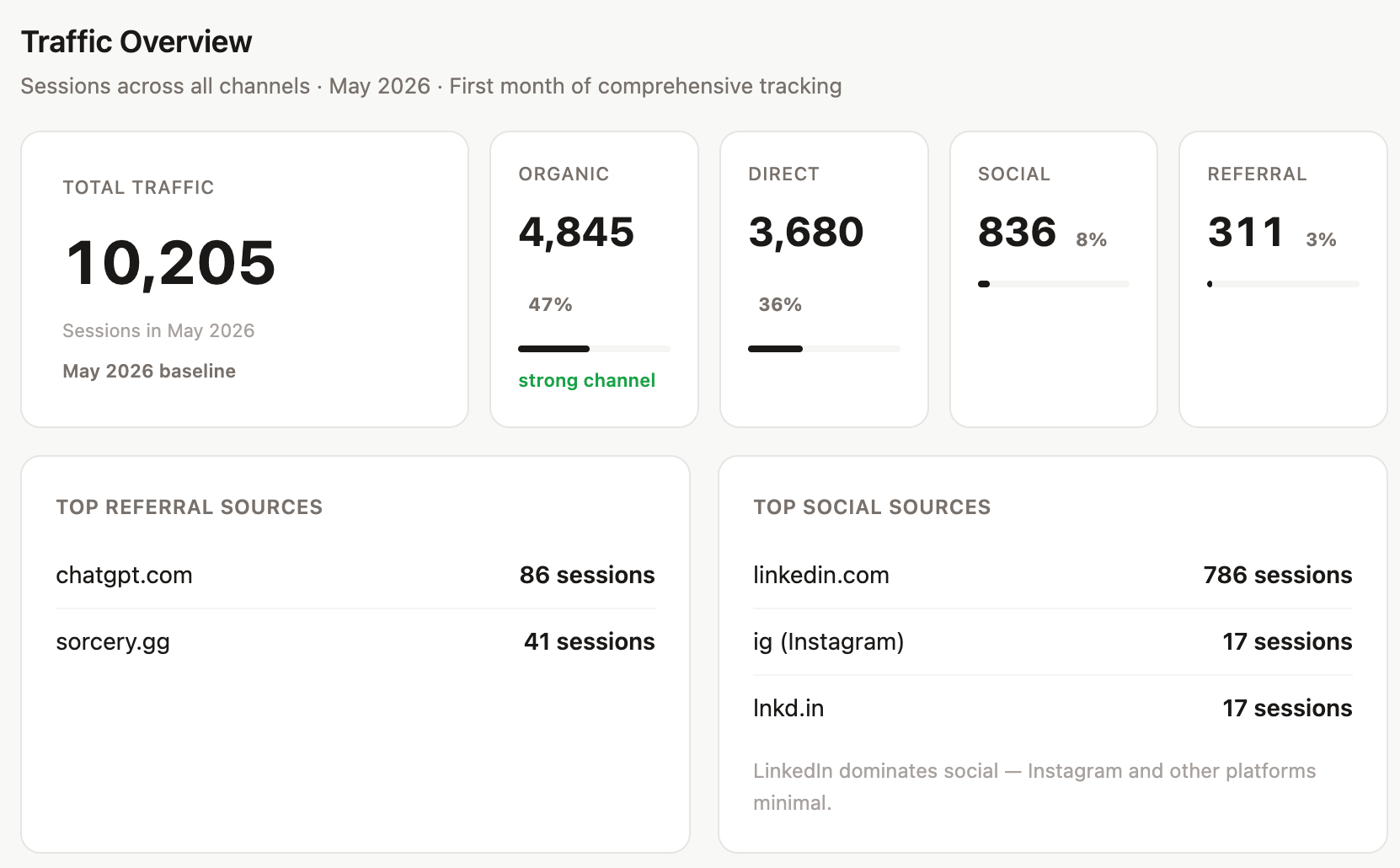
A clean dashboard accessible through a private link per client that lives online under my domain and updates every month. There's a month-switcher so history builds over time.
It shows:
The report adapts. If a client has newsletter data that month, it shows a newsletter section. If they don't, it doesn't. If MQL data is in, it shows conversions. If not, it doesn't prompt for it. It's not a template with empty fields. It knows what's there.
Behind the clean dashboard is GA4 OAuth, Ahrefs API, Peec API, Airtable as the memory layer storing every month permanently, a Git-connected Vercel deployment with a custom domain and noindex headers so client data doesn't end up in search results, a preview-before-publish workflow, and me knowing exactly what to track because I've been doing this long enough to know what correlates with pipeline.
I'm not going to walk you through how it's all connected. But I'll tell you this: if your agency is still doing this manually, it's not that you're behind. It's that building this well only became possible in the last year or so. Most people are still waiting for someone else to figure it out first.
It's best if you know how to do the thing manually before you automate it. You need to have organized content operations. You need to know which numbers matter and why. The system doesn't have opinions about that, but you do.
I can now give my clients accurate, thoughtful, well-designed reports every single month without the week of work. And the system gets better because performance data feeds straight back into what we do next. It's a feedback loop that I've been telling you about.
If you want to know which specific tools are connected and how, reply and tell me. If enough people ask, I'll do a full breakdown in a future issue.
Kateryna
P.S. If we aren't connected already, follow me on LinkedIn and Instagram. If you like this newsletter, please refer your friends.
P.P.S. Need help with quality content? Zmistify your content with Zmist & Copy


The main reason why so many blog posts don't get read is that they have bad introductions. Getting straight to the point and sticking with it all the way through comes down to knowing your message. Read on to learn about a few strategies on how to start your blog posts.

Why this CEO would rather watch his traffic crash than hire another SEO expert
Subscribe to From Reads to Leads for real-life stories, marketing wisdom, and career advice delivered to your inbox every Friday.


